News
Manage news visibility and pinned posts
Control whether a news item is visible and whether it is kept near the top.
Last reviewed: 14 September 2026
Follow these steps
From the left menu, select News.
Find the news item in the list.
Turn Published on to show it to residents, or off to hide it.
Turn Pinned on to keep an important item near the top.
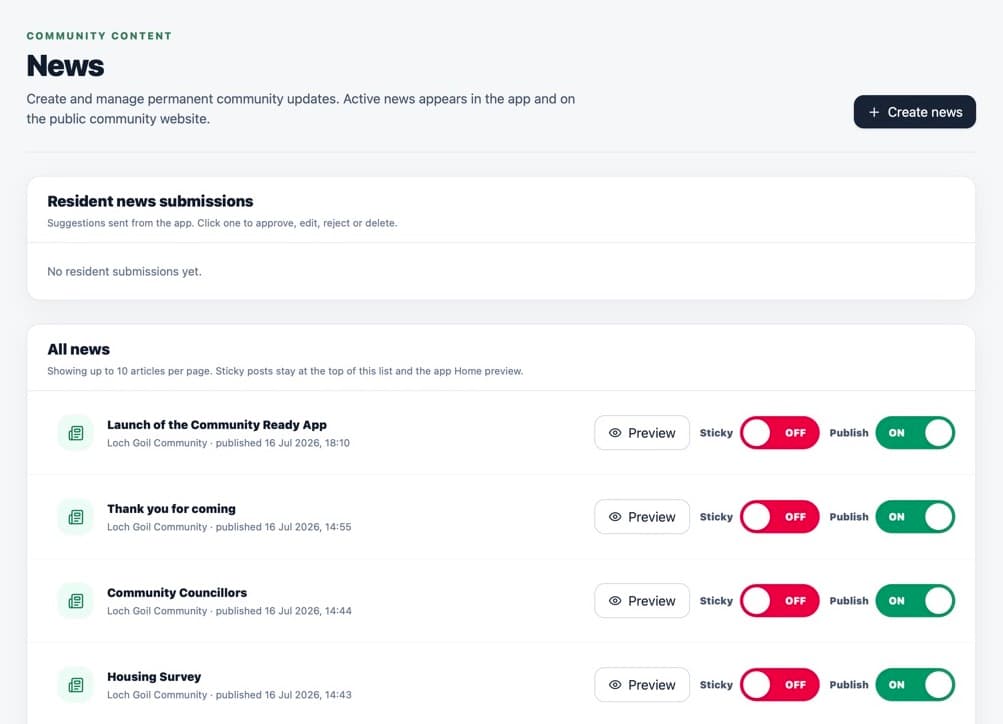
Pinned changes the order. Publish controls visibility. Select the item row to edit its content.
Use the delete option inside the item only when it should be permanently removed. You will be asked to type its exact title.
What happens next
Visibility changes update the app and public website. A hidden item remains in the portal so it can be edited or published again.
Was this helpful?